 uControl
Discovery in NAT'd Environments
Discovery in NAT'd Environments
This page explains how uControl Insight discovery works with Network Address Translation (NAT) and provides architecture recommendations for NAT'd sites.
What Works
Outbound scanning from behind NAT
If the control plane or worker agent is behind NAT, discovery works normally. All scan connections are initiated outbound (SSH, WinRM, SNMP, HTTPS APIs) — NAT does not affect outbound-initiated connections.
Scanning targets on the same private network
This is the ideal scenario. Smart Scan probes CIDR ranges on the local private network. Workers deployed on-site scan local RFC1918 addresses directly with no NAT traversal involved.
Limitations
1:1 Static NAT (targets behind NAT)
Works if you configure the discovery target with the NAT'd public IP. SSH, WinRM, and SNMP will connect to the public IP, and NAT translates to the private host.
The asset will be recorded with the public IP as its primary identifier
The private IP won't be visible unless the host reports it via SSH/WinRM interface enumeration
Use targeted scans (not Smart Scan) for individually NAT'd hosts
PAT / Port Forwarding (many:1 NAT)
Partially works with manual configuration:
Configure individual targets with
host:portfor each forwarded port (e.g.,203.0.113.5:2222for SSH forwarded to an internal host on port 22)Smart Scan and seed scans will not work — they probe well-known ports (22, 80, 135, 443, etc.) which won't match non-standard port-forwarded mappings
Each port-forwarded host needs its own targeted scan entry
Identity Resolution Across NAT Boundaries
This is the primary challenge with NAT. If the same host is discovered from two different networks:
Public IP scan (from outside NAT) — records the host with its public IP
Private IP scan (from inside NAT, e.g., a worker) — records the host with its private IP
These may create two separate assets because the IPs don't match.
Mitigation: Identity resolution uses multiple identifiers in priority order:
Serial number
Virtualization UUID (BIOS UUID)
MAC address
FQDN
IP address (lowest priority)
If the SSH or WinRM connector collects a serial number, BIOS UUID, or MAC address, the assets will merge correctly regardless of which IP was used to reach the host. Only IP-only assets (e.g., seed scan results) risk duplication across NAT boundaries.
Flow Analytics with NAT
Exporter Location | IPs in Flow Data | Asset Mapping |
|---|---|---|
Inside NAT boundary | Pre-NAT (private) IPs | Maps correctly to locally discovered assets |
Outside NAT boundary | Post-NAT (public) IPs | Will NOT match privately-discovered assets |
NAT device itself | Depends on exporter config | Some routers can export both pre- and post-NAT IPs |
For best results, deploy flow exporters (or a worker with flow collection enabled) inside each NAT boundary.
Recommended Architecture
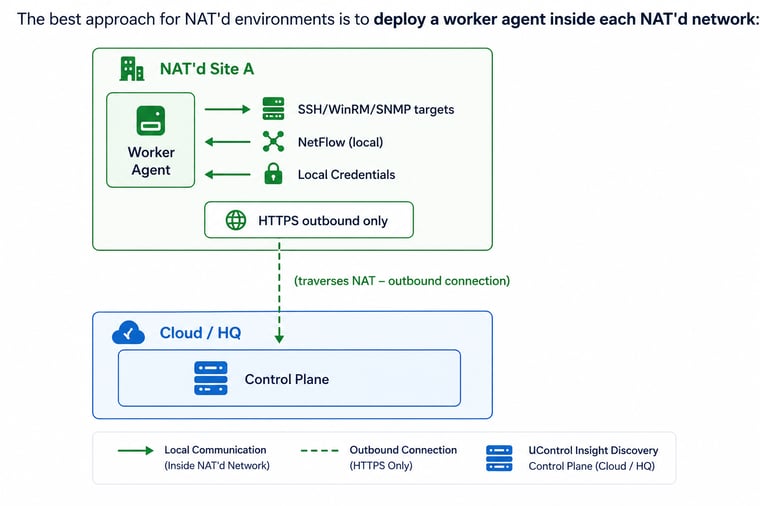
Benefits of this approach:
Workers scan local private IPs directly — no NAT traversal needed
Workers connect outbound to the control plane — works through any NAT or firewall
Credentials stay on-prem in the worker's encrypted local store
Flow collectors on workers receive local NetFlow with private IPs that map correctly to discovered assets
No inbound firewall rules needed at the remote site
This is the architecture the worker agent system was specifically designed for — it completely sidesteps NAT issues.
Configuration Checklist for NAT'd Sites
Step | Action |
|---|---|
1 | Deploy a worker agent inside the NAT'd network |
2 | Generate a worker API key scoped to the site (sidebar → Workers) |
3 | Configure the worker with the control plane's public URL (the worker connects outbound) |
4 | Create credentials on the worker's local management UI (or let the control plane push them) |
5 | Create discovery targets with the site label matching the worker — use private CIDR ranges |
6 | If using flow collection: configure routers/switches to send NetFlow to the worker's IP (UDP 2055/4739) |
7 | Run a scan — the control plane routes the job to the worker, which executes locally |
Current Limitations
No NAT translation table awareness — uControl Insight does not query router NAT tables to map public ↔ private IPs
No automatic asset merging across NAT — if the same host appears with both a public and private IP and has no other matching identifiers (serial, UUID, MAC, FQDN), it creates two assets. These can be manually merged from the asset detail page.
Port-forwarded Smart Scan — seed scans assume standard ports. Non-standard forwarded ports will not be detected. Use targeted scans instead.
Double-NAT / CGNAT — carrier-grade NAT (100.64.0.0/10) adds another layer. The self-seed analysis will flag CGNAT ranges with a "CGNAT (RFC6598)" label so you can exclude them.