<img height="1" width="1" style="display:none;" alt="" src="https://px.ads.linkedin.com/collect/?pid=7178634&amp;fmt=gif">
uControl Book a demo
TekReady · Prepare

Onboard ITSM customers in days, not months.

TekReady turns the slow, spreadsheet-driven setup of a new customer's ITSM environment into a guided, auditable sequence, with approval gates at every stage and intelligent defaults so your team focuses on the decisions that matter.

  • Approval gate at every stage
  • Full change audit trail
  • HLD document in 5 languages
11
configuration sections
4-stage
approval sign-off
5
HLD languages
AI-assisted
catalogue setup
See it in action

From blank engagement to signed-off configuration.

Watch a 3–5 minute walkthrough of a real TekReady engagement, building sections, running AI suggestions, moving work through approvals, and generating the customer-ready HLD.

What TekReady does

Everything a clean ITSM onboarding needs.

Replace the spreadsheet emailed back and forth with a structured, governed workflow, where every decision has a place, a status and an owner.

Guided engagement workflow

Every onboarding becomes a browser-based sequence of sections, AD, service levels, priorities, categories, workflows, each with a known place, owner and status.

Four-stage sign-off

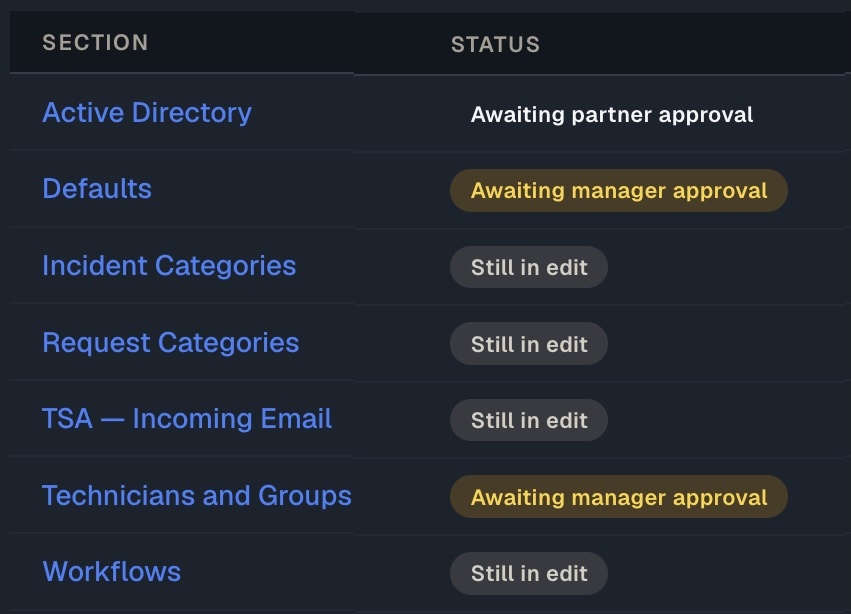
A built-in approval state machine moves every section through Draft → Submitted → Manager Approved → Final, so half-finished data can never be promoted by accident.

Complete audit trail

Every edit, submission and approval is logged with actor, timestamp and before/after value, answer “who set this, and when?” without digging through email.

AI priority suggestionsAI-assisted

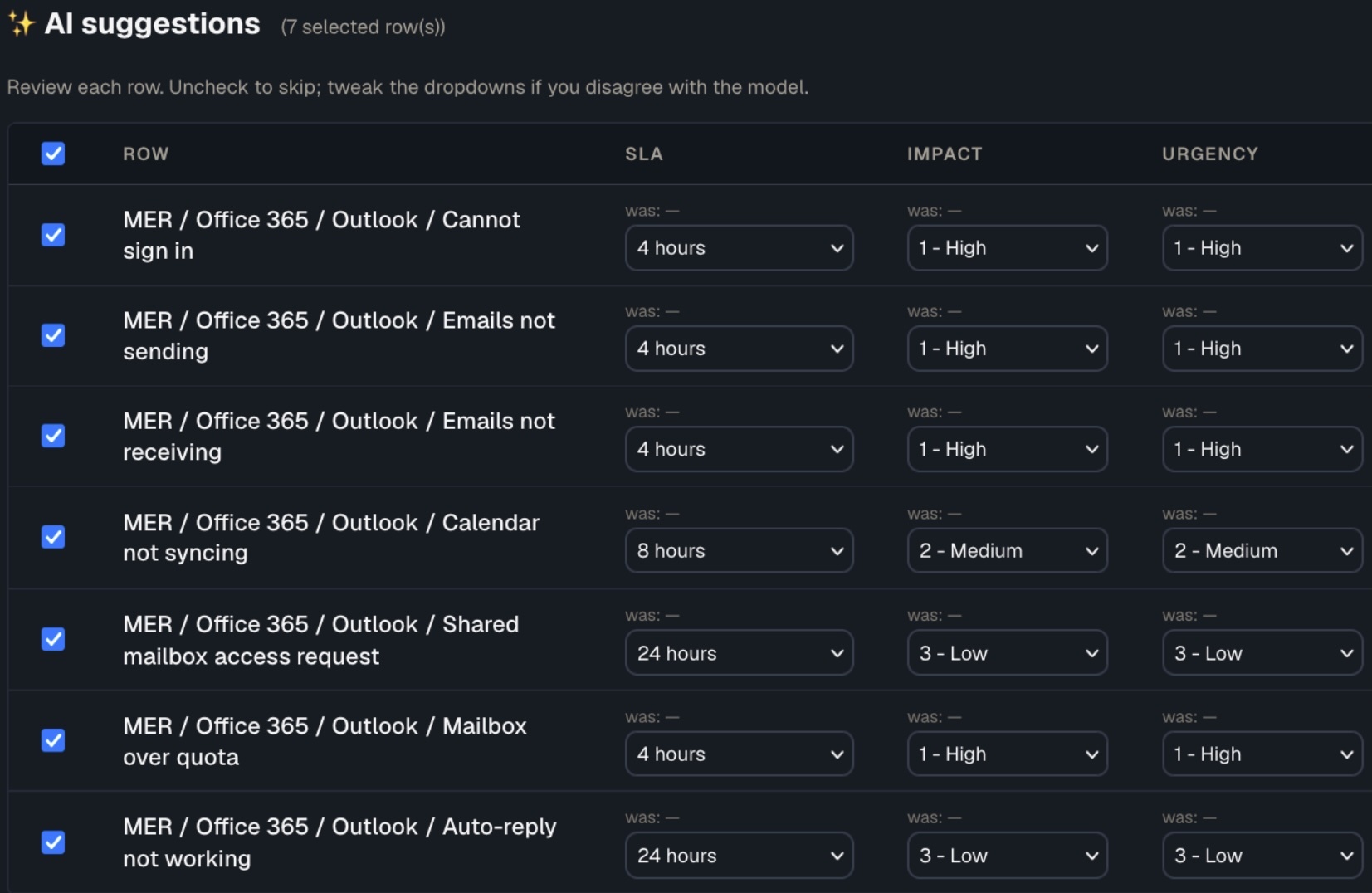
For any category missing an SLA, Impact or Urgency, AI suggests the right values from your engagement's own lists, per row or in bulk, always preview-first.

AI catalogue generationAI-assisted

Type a topic like “VPN access” and get ~10 ready-to-use catalogue rows back, full category path, code and priority filled. Review, edit, accept.

AI workflow assistanceAI-assisted

Get AI help sketching the lifecycle steps for a request type, working from your engagement's own option lists, opt-in and preview-only.

Signed-off HLD document

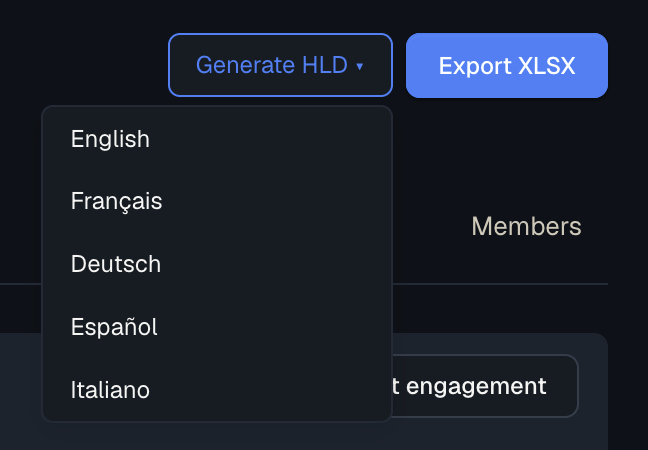
Generate a formatted High-Level Design as a Word .docx, built from your configured sections and downloadable in English, French, German, Spanish or Italian.

EasyVista catalog sync

Once signed off, the agreed Incident and Request catalogues pull straight into EasyVista, no re-keying. TekReady stays the source of truth.

Intelligent defaults

Seed each section with sensible ITSM defaults you edit rather than starting blank, then scale to hundreds of categories with an idempotent XLSX round-trip.

XLSX bulk round-trip

Download a template pre-loaded with dropdowns from your engagement's own values, bulk-edit hundreds of rows in Excel, and re-import, duplicates skipped, unknowns flagged.

Role-based engagement access

Each engagement has its own membership, Editors, Managers, Partner approvers, Viewers, enforced server-side to the API, so people only see the work they're on.

Due dates & progress dashboard

Set a target date per section; the engagement overview shows every section's state at a glance and flags anything overdue or due within seven days.

The approval state machine

Every chapter carries its own auditable sign-off.

Each section walks Draft → Submitted → Manager Approved → Final, and locks the moment it's submitted, so half-finished data is never promoted by accident.

  • Forward-only: reversing requires an explicit reject with a reason
  • Two approvers, Customer Manager and Partner sign off separately
  • Access enforced server-side; non-members get 403, not just a hidden button
  • Every state change logged with actor, timestamp and before/after
TekReady - Sign Off
AI-assisted configuration

Draft the boring 80%, keep control of every row.

AI suggests priority matrices and generates catalogue rows from a topic, anchored to this customer's own SLA, Impact and Urgency lists. So “Cannot sign in” and “Cannot share screen” get sensibly different priorities.

  • Topic seed returns ~10 rows with category path, code and priority filled
  • Type-aware: symptoms on Incidents, planned asks on Requests
  • Preview-never-auto-apply, idempotent, and audited like a manual edit
  • Opt-in: enable with your own OpenAI, Anthropic or local model
TekReady AI
The High-Level Design deliverable

One click turns the engagement into a customer-ready document.

TekReady builds a formatted Word .docx from every configured section, cover page, executive summary, then a chapter per section, ready for sign-off and hand-off to implementers.

  • Download-time picker: English, French, German, Spanish or Italian
  • Translates structure and labels; your entered values stay as typed
  • Empty sections are omitted automatically
  • Generate any time; Draft sections double as a live working proof
TekReady - Multi Language
Questions

Frequently asked.

Which ITSM platforms does TekReady support?

TekReady captures configuration for any ITSM tool, EasyVista, ServiceNow, BMC Helix, Jira Service Management and others. Automated catalogue sync is currently EasyVista-only via Easy Connect; for other platforms the export is a manual hand-off using the captured data and HLD.

Can the customer work in the tool alongside us?

Yes. Invite the customer's SMEs as Editors and their manager as an approver; they edit and submit sections in the same tool, while Viewers get read-only access for sponsors. Each engagement is restricted to its own membership.

What happens if we need to change something after a section is signed off?

Any reviewer can reject a Final section back to Draft, a reason is required. The section reopens for editing and the full history of previous approvals is preserved in the audit log.

Do we have to use the AI features?

No. AI is opt-in. It only appears after an administrator enables it and configures a provider (OpenAI, Anthropic, or a local model). With it off, every non-AI flow works normally, and every AI suggestion is a preview you confirm.

How do we load a large catalogue quickly?

Use the XLSX round-trip, download a template with pre-populated dropdowns, bulk-edit in Excel, and upload. Import is idempotent: duplicates are skipped and unknown values flagged. AI topic-seed can also generate about ten rows at a time.

Can we produce the design document in the customer's language?

Yes. At HLD download you pick English, French, German, Spanish or Italian; the document's structure and labels are translated while your entered values stay as typed. Your own interface language is set separately per user.

Why we built it
Onboarding and migrating ITSM platforms are where projects can stall — with inconsistent configurations, endless manual data entry, and no single source of truth. We built TekReady to make that fast, governed and repeatable, so customers go live in days with a configuration they can actually trust.
G Glyn Hobbs Product Owner / Head Of Professional Services

Stop onboarding customers in spreadsheets.

See how TekReady takes a new ITSM engagement from blank to signed-off, audited and ready to implement.

Book a demo