 uControl
Architecture & Deployment Models
Architecture & Deployment Models
uControl Insight supports multiple deployment topologies depending on your environment — from a single on-premises server to a cloud-hosted control plane with distributed on-premises workers.
Core Components
Component | Description | Technology |
|---|---|---|
Control Plane | Central web application — hosts the UI, REST API, normalization pipeline, Aha Engine, and scheduler. Manages all asset data and discovery orchestration. | Java 21, Spring Boot 3.3, Tomcat 10, MariaDB 10.5+ |
MariaDB Database | Stores all asset inventory, relationships, identifiers, discovery runs, credentials (AES-256-GCM encrypted), audit logs, and flow data. | MariaDB 10.5+ or MySQL 8.0+ |
Worker Agent (optional) | On-premises agent deployed at remote sites. Executes discovery scans locally and streams results back to the control plane over HTTPS. All traffic is outbound — no inbound ports required at the remote site. | Java 21, Spring Boot, embedded H2 database |
Flow Collector (optional) | Receives NetFlow v5/v9 and IPFIX UDP packets from routers/switches. Can run standalone, embedded in the control plane, or as part of a worker agent. | Netty UDP listener |
Deployment Model 1: Single Server (On-Premises)
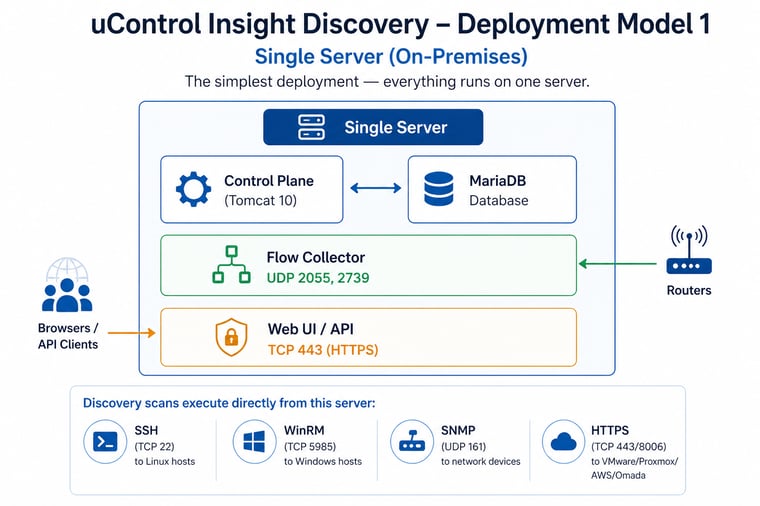
Best for: Small to medium environments (up to 5,000 assets), single site, simple setup.
Deployment Model 2: Cloud Control Plane + On-Premises Workers
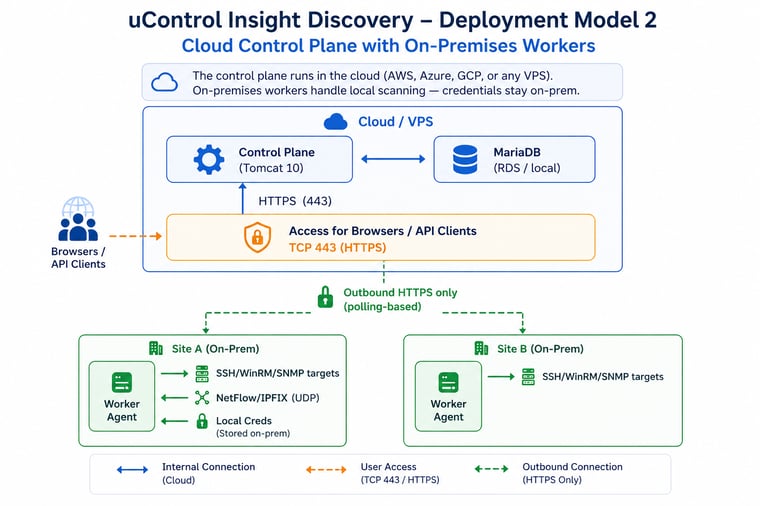
Key benefits:
Workers initiate all connections (outbound HTTPS only) — no inbound firewall rules needed at remote sites
Credentials are stored in the worker's encrypted local H2 database — they never leave the site
Flow data is batched and sent to the control plane via HTTP POST
Multiple sites supported — each worker is scoped to a site label
Best for: Multi-site organisations, cloud-first strategy, environments where credentials must stay on-premises.
Deployment Model 3: Hybrid (Control Plane + Local + Remote)
Control plane runs on-premises or in the cloud. Some targets are scanned directly from the control plane; remote sites use workers.
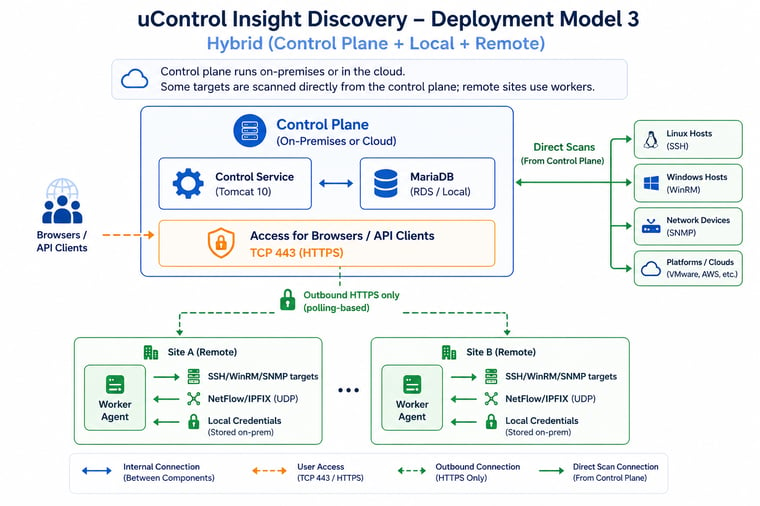
Best for: Organisations with a mix of local and remote infrastructure, or gradual migration to cloud.
Firewall Rules
Control Plane Server
Direction | Port | Protocol | Source / Destination | Purpose |
|---|---|---|---|---|
Inbound | 443 (or 8180) | TCP | Browsers, API clients, workers | Web UI, REST API, worker polling |
Inbound | 2055 | UDP | Network routers/switches | NetFlow v5/v9 collection (if local collector) |
Inbound | 4739 | UDP | Network routers/switches | IPFIX collection (if local collector) |
Outbound | 22 | TCP | Linux/UNIX targets | SSH discovery (if scanning directly) |
Outbound | 5985 | TCP | Windows targets | WinRM discovery (if scanning directly) |
Outbound | 161 | UDP | Network devices | SNMP discovery (if scanning directly) |
Outbound | 443 | TCP | VMware/Proxmox/AWS/Omada | API-based discovery (if scanning directly) |
Outbound | 8006 | TCP | Proxmox VE hosts | Proxmox API (if scanning directly) |
Outbound | 3306 | TCP | MariaDB server | Database (if external DB) |
Worker Agent (On-Premises)
Direction | Port | Protocol | Source / Destination | Purpose |
|---|---|---|---|---|
Outbound | 443 | TCP | Control Plane | HTTPS polling, result upload, flow batch upload |
Outbound | 22 | TCP | Linux/UNIX targets | SSH discovery |
Outbound | 5985 | TCP | Windows targets | WinRM discovery |
Outbound | 161 | UDP | Network devices | SNMP discovery |
Outbound | 443 | TCP | VMware/Proxmox/Omada | API-based discovery |
Outbound | 8006 | TCP | Proxmox VE hosts | Proxmox API |
Inbound | 2055 | UDP | Network routers/switches | NetFlow collection (if flow collector enabled) |
Inbound | 4739 | UDP | Network routers/switches | IPFIX collection (if flow collector enabled) |
Inbound | 8443 | TCP | Local browser (optional) | Worker local management UI |
Key point: Workers require no inbound rules for core operation — they poll the control plane outbound. Inbound rules are only needed if you enable the flow collector or local management UI on the worker.